iPhone · no server · no account
Measure a room. Price it. Get it signed.
Scan a room with an iPhone, tape one wall each way, and the takeoff, price, proposal and claim all come off the same measurements. No server, no account.
SCANNED
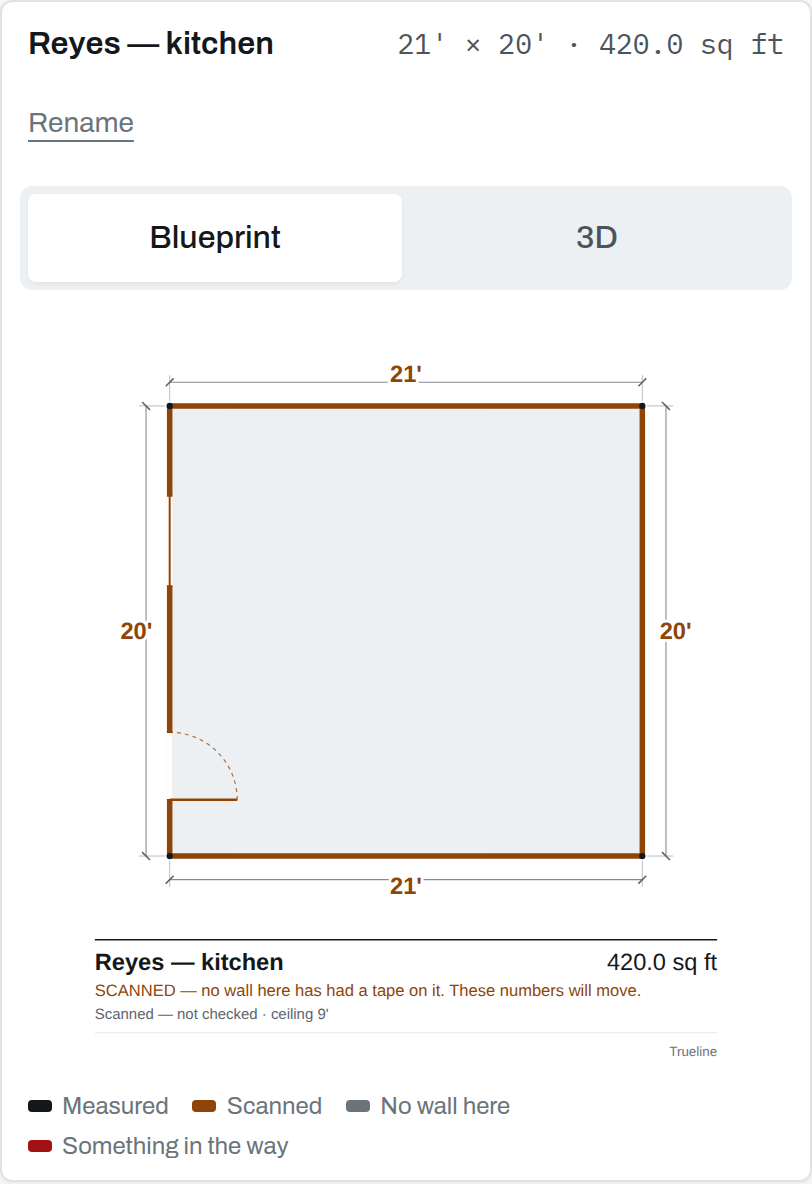
What it puts on the drawing
Every length says where it came from
A length the phone found is Scanned. A length you put a tape on is Measured. A room drawn on a grid says Drawn.
Until a tape has been on one wall running each way, every document says so, on its face, where a client will read it. A number you cannot defend line by line to a homeowner is worse than no number.
What it costs
Free to measure. Paid to price.
One seat, no per-project fee, and no charge for a client to open something you sent them.
Free, and staying free
- Measuring the room
- The drawing
- The room in 3D
The subscription
- The takeoff
- The pricing
- The proposal and change orders
- The claim document
- The exports
Not on the App Store yet. Trueline is in testing with a working remodeling contractor. The prices above are what it will be sold for; nothing is on sale today, and this page will say so until it is. Leave an email for the TestFlight link.
Watch it work
Two films, of the real app
Neither is a mock-up or a best take. Both were filmed by driving the app itself, so every tap is a real tap and every figure on screen is one it worked out.
How a job goes through it
Walk in. Leave with it signed.
Six steps, in the order they happen on site.
Walk the room
The phone finds the walls, the doors and the windows in about ninety seconds. No LiDAR? Tap the corners onto a grid.
Put a tape on it
One wall running each way. The app says which walls are worth measuring, and why.
Take it off
Floor, ceiling, wall face, baseboard, framing, every door and window deducted. The arithmetic is shown rather than hidden.
Price it from your own book
Your rates, typed once. No averages, no market data — a number you set times a number the room measured.
Get it signed
A proposal in sentences, an exclusions list, and a record of who signed, when, and the exact words.
Bill against what was signed
Deposits, progress payments and the final. Anything that changes becomes a change order.
Specification
What is in it, and where it lives
There is no Trueline server. Nothing is uploaded, nothing is analysed, and there is no way for one person’s house to reach another’s.
- The drawing
- A plan with real dimension lines, doors, windows, north and your letterhead. Blueprint or 3D.
- The takeoff
- Every quantity with its workings, as a sheet you can send, copy, or open in a spreadsheet.
- Insurance
- Damage marked while you stand in front of it. Photographs, moisture readings over time, a claim document, and ESX for Xactimate.
- Scheduling
- Days into your own calendar. Invoices off the signed scope. A QuickBooks export.
- Your business
- Licence number, insurance, logo and rates typed one time and on every document after that.
- Written on the phone
- On an iPhone with Apple Intelligence it drafts the scope paragraph and the loss description from figures it already has — free, offline, nothing leaves the device. You read every word first.
- The rooms
- A folder per scan, visible in the Files app. AirDrop one, mail one, copy one off. No account needed to read your own work.
- The backup
- Your own iCloud — not ours. A corrected room is a few kilobytes, so a free iCloud account holds a very large number of them.
- The photographs
- On the phone. A scan’s pictures run to tens of megabytes, so sending them up is a decision per job rather than a default.
5 calculators · free
Do the sum here, with the app’s own arithmetic
Not a form with some arithmetic typed into it. Each one imports the same measuring code the app runs — whole nanometres, whole cents, no floating-point number in any measurement — so the answer on the web page is the answer on the phone. None of them will invent a waste figure, a coverage rate or a price.
The one thing this page asks for
Leave an email. Get the TestFlight link.
One email, when there is something to install. No newsletter, no drip sequence, no sharing it with anybody. If you would rather just write: support@trueline.tools.
Stored by Netlify as form submissions. Nothing else happens to it.